



The DataForge CSV Import feature lets you create multi-share SMB to SMB jobs easily.
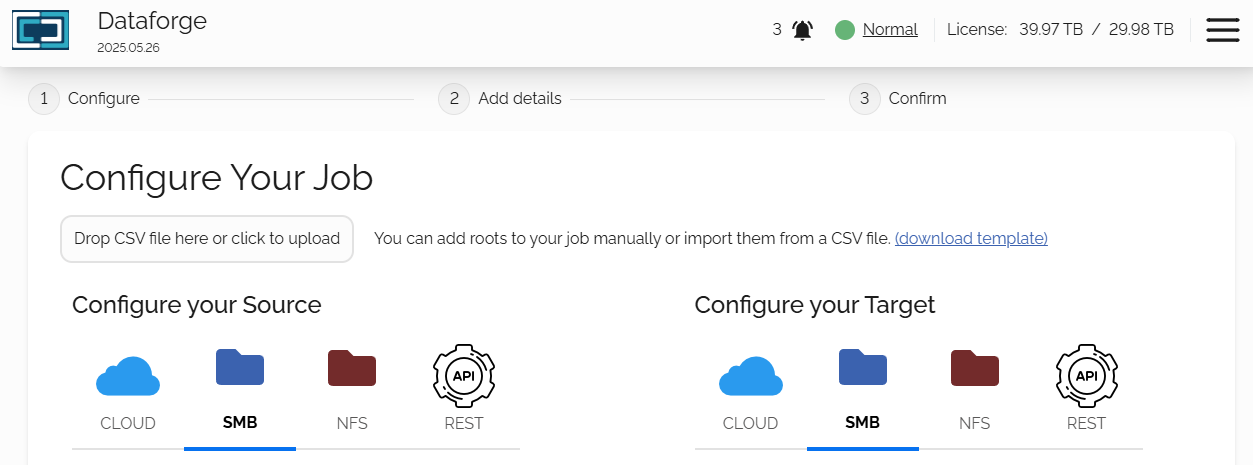
By creating a simple csv file with your source and target share information as well as SMB credentials if needed, you can import your jobs all at once.
How-To
To prepare for the import, you will need to understand the required structure of the csv.
To download an example of this file, simple navigate to the Jobs page, click the Create New Job button and click on the 'download template' link.
This will download the csv import template, providing you with sample information that you can use and replace with your info.
Populate CSV Import File
Please note: All columns must be encapsulated with double quotes: "text"
The first line of the csv needs to be the header:
"sourceName","sourceProviderType","sourceDisplayName","targetName","targetProviderType","targetDisplayName"
The csv file is simple and has 6 columns to work with:
- sourceName: Source SMB UNC path
- sourceProviderType: Will always be SMB
- sourceDisplayName: The display name of the source SMB credentials
- targetName: Target SMB UNC path
- targetProviderType: Will always be SMB
- targetDisplayName: The display name of the target SMB credentials
Let's create a csv file with sample data:
Note: For this example I am using 2 source/target combos, you can add as many as you'd like. However if the UNC paths are subdirectories of a single root, it is advised to create a single job using the root path.
Share #1:
- Source: \\old-file-cluster-1\sharename\folder1
- Target: \\new-file-cluster-1\sharename\folder1
- Source credentials name: SourceClusterCredentials
- Target credentials name: TargetClusterCredentials
Share #2:
- Source: \\old-server-3\sharename\important documents
- Target: \\new-server-3\sharename\important documents
- Source credentials: This server doesn't have access credentials
- Target credentials: FancyNewCredentials
The csv file:


